Skill Sets
Collections of custom skills that extend your AI agent's capabilities.
Skill Sets are bundles of custom skills — specific actions your AI agent can take beyond conversation. Skills let the agent fetch data, integrate with external services, and run custom workflows.
What a Skill Set is
- A bundle of related skills — Grouped actions your agent can perform
- Custom functionality — Extend the agent with specific capabilities
- Reusable — Share and install across workspaces
- Versioned — Track changes and updates
- Configurable — Set up before use
What you can do with Skill Sets
Skill Sets let your agent:
- Perform actions — Check orders, book appointments, and more
- Integrate services — Connect to external APIs
- Run custom workflows — Build specialized conversation flows
- Go beyond Q&A — Add functionality past knowledge-based answers
- Automate tasks — Handle complex operations on its own
What individual skills can do
Each skill within a Skill Set can:
- Fetch data — Retrieve information from external sources
- Perform actions — Create, update, or delete data
- Integrate APIs — Connect with third-party services
- Process information — Transform and analyze data
- Trigger workflows — Kick off complex processes
What's inside a Skill Set
A Skill Set typically contains:
- Name and description — What the Skill Set does
- Multiple skills — Individual actions within the set
- Configuration — Settings required to run
- Versioning — Tracks updates and changes
Opening Skill Sets
- Go to your Cloodot dashboard.
- Navigate to Intelligence → Skill Sets.
- You'll see available Skill Sets and options to create or install new ones.
Managing Skill Sets
Three tabs on the page
- Installed — Skill Sets currently in use
- Explore — Skill Sets you can browse and install
- My Skill Sets — Skill Sets you've created
Install a Skill Set
- Browse available Skill Sets.
- Click a Skill Set to view its details.
- Click Install.
- Configure any required settings.
- The Skill Set is now available for your agent to use.
Skill sets that install automations
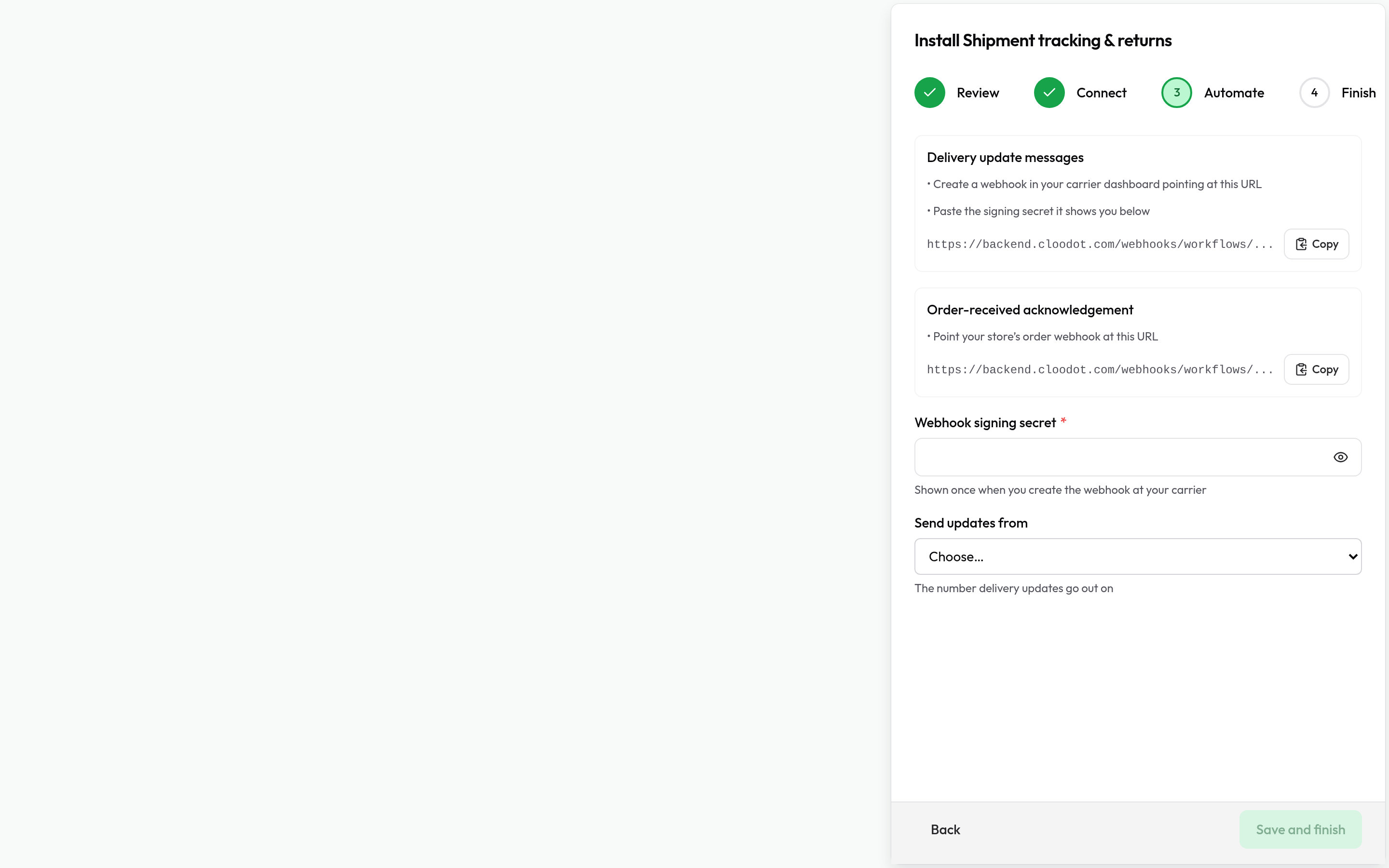
Some Cloodot-published skill sets install more than skills: a shipment tracker, for example, also sets up a workflow that messages the customer when the carrier reports a delivery, and submits the WhatsApp message template that workflow sends. Installing one of these opens a stepped setup instead of a single form:
- Review — exactly what installing adds: the skills, each automation, and any message template (submitted to WhatsApp for approval). Everything added is yours — edit or remove it any time.
- Connect — credentials for the underlying service, like an API key.
- Automate — the automation's own needs: each workflow's webhook URL to register at the provider (with its setup steps), the provider's webhook signing secret, and choices like which channel updates send from.
-
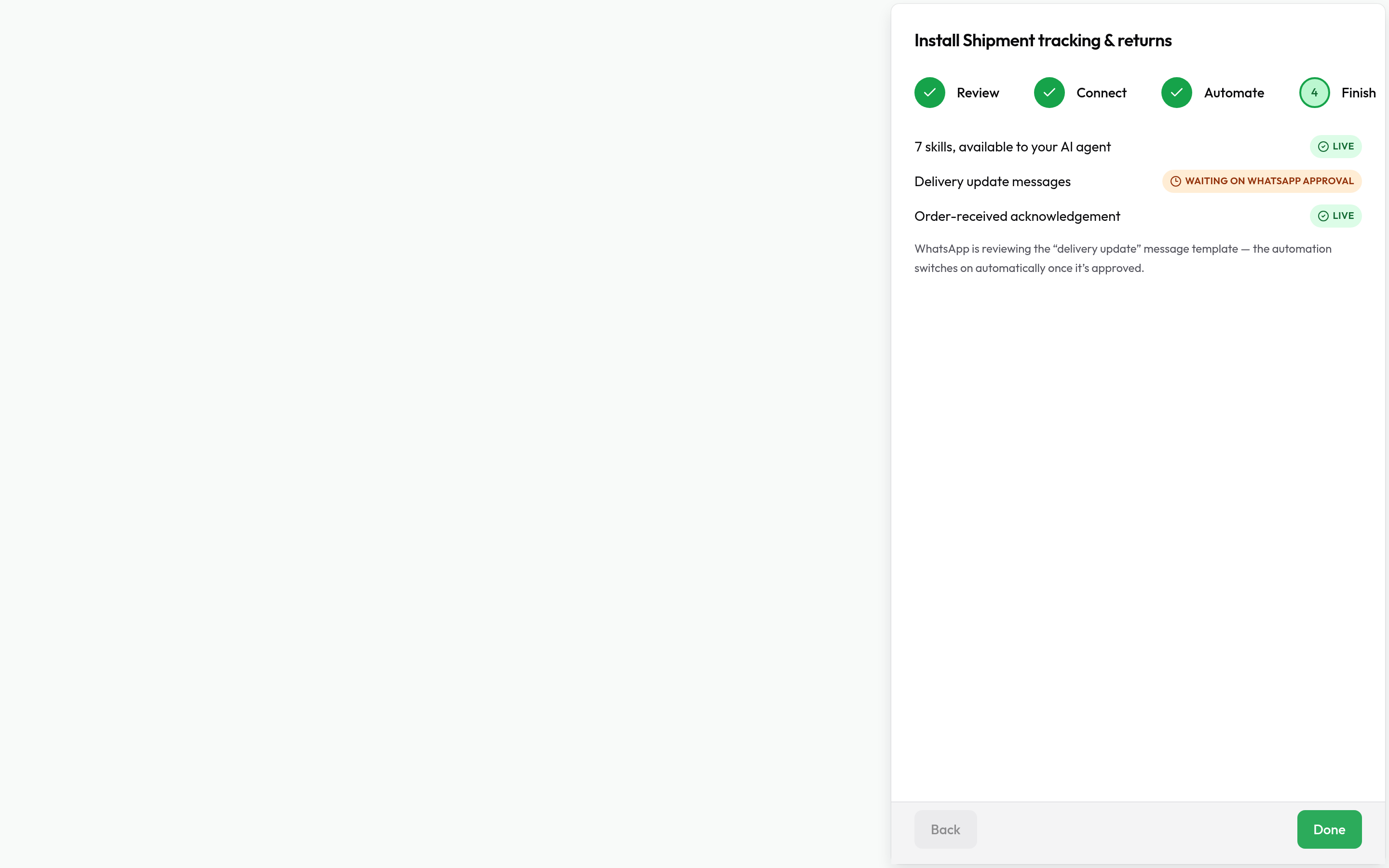
Finish — an honest status per piece:
- Live — switched on and running.
- Waiting on WhatsApp approval — the automation switches itself on when Meta approves its message template; nothing to do.
- Needs a switch-on — installed but off, with a note saying why (for example, the installer didn't have workflow permissions, or the plan's active-workflow limit is reached). Switch it on from Automations → Workflows when ready.
Worth knowing as you live with one of these:
- The workflows are real workflows. They appear in Automations → Workflows with run history, and you can edit them like any other.
- Updates never overwrite your edits. If you've customised a provisioned workflow, a skill-set update saves its new version inactive in the workflow's version history for you to review — it never replaces what you changed. Untouched workflows take updates automatically.
- Approved templates are never edited in place. A template change is submitted as a new copy; the automation keeps sending the approved one and switches over only when WhatsApp approves the replacement.
- Uninstalling pauses, never deletes. The workflows and their run history stay in your workspace, paused; reinstalling re-adopts them.
- The webhook secret lives in the skill set's settings. Rotate it there and every workflow the skill set installed picks it up.
Create a Skill Set
You can create Skill Sets by:
- Writing custom code — Build skills manually in the dashboard
- Forking — Copy and modify an existing public Skill Set
- Generating with AI — Available through the Developer API and the Cloodot MCP server (not the dashboard)
For a step-by-step walkthrough, see Creating Skills and Skill Schema.
How installed Skill Sets behave
Once installed, Skill Sets are:
- Automatically available — The agent uses skills when appropriate
- Context-aware — Skills activate based on conversation context
- Tracked — Skill usage is logged for monitoring
Best practices
Choosing Skill Sets
- Relevance — Install Skill Sets that match your business needs
- Compatibility — Confirm they work with your setup
- Documentation — Review the Skill Set's docs before installing
- Security — Review Skill Set Security before providing API keys or secrets to third-party Skill Sets
- Testing — Test in the playground before deploying
Managing Skill Sets
- Keep them updated — Stay on recent versions
- Monitor usage — Track which skills get used most
- Review performance — Assess effectiveness
- Remove unused ones — Uninstall what you don't need
Build custom skills
- Skills Overview — Skill system architecture and concepts
- Creating Skills — Step-by-step build guide
- Skill Schema — Technical structure and validation rules
- AI agent skills — Build a skill as a workflow instead of code, when it doesn't need computation, a nested response, or a third-party SDK
Security
- Skill Set Security — How secrets and data are handled by third-party Skill Sets
Advanced integration
- MCP Servers — Connect external services via Model Context Protocol
- Copilot Settings — Configure advanced AI features and integrations
- Integrations — Connect external tools and services
Related Intelligence features
- AI Agent Configuration — Configure your agent to use Skill Sets
- Knowledge Base — Complement skills with knowledge
- FAQ Management — FAQs that work alongside skills
What's next
- Explore available Skill Sets in your dashboard.
- Install Skill Sets that match your needs.
- Configure your AI Agent to use installed Skill Sets.
- Monitor how Skill Sets extend your agent's capabilities.
Ready to build your own? Start with the Skills Overview and Creating Skills guides.