AI agent skills
Publish a workflow as a tool your AI agent can call mid-conversation — it answers the agent, then keeps running in the background.
Most workflows wait for an event: a message arrives, a label goes on, a webhook lands. A workflow on the AI Agent Skill trigger waits for something else — the AI agent deciding, mid-conversation, that this is the thing to do — and it can answer the agent before carrying on with the rest of its steps.
That gives you one automation for both halves of a job:
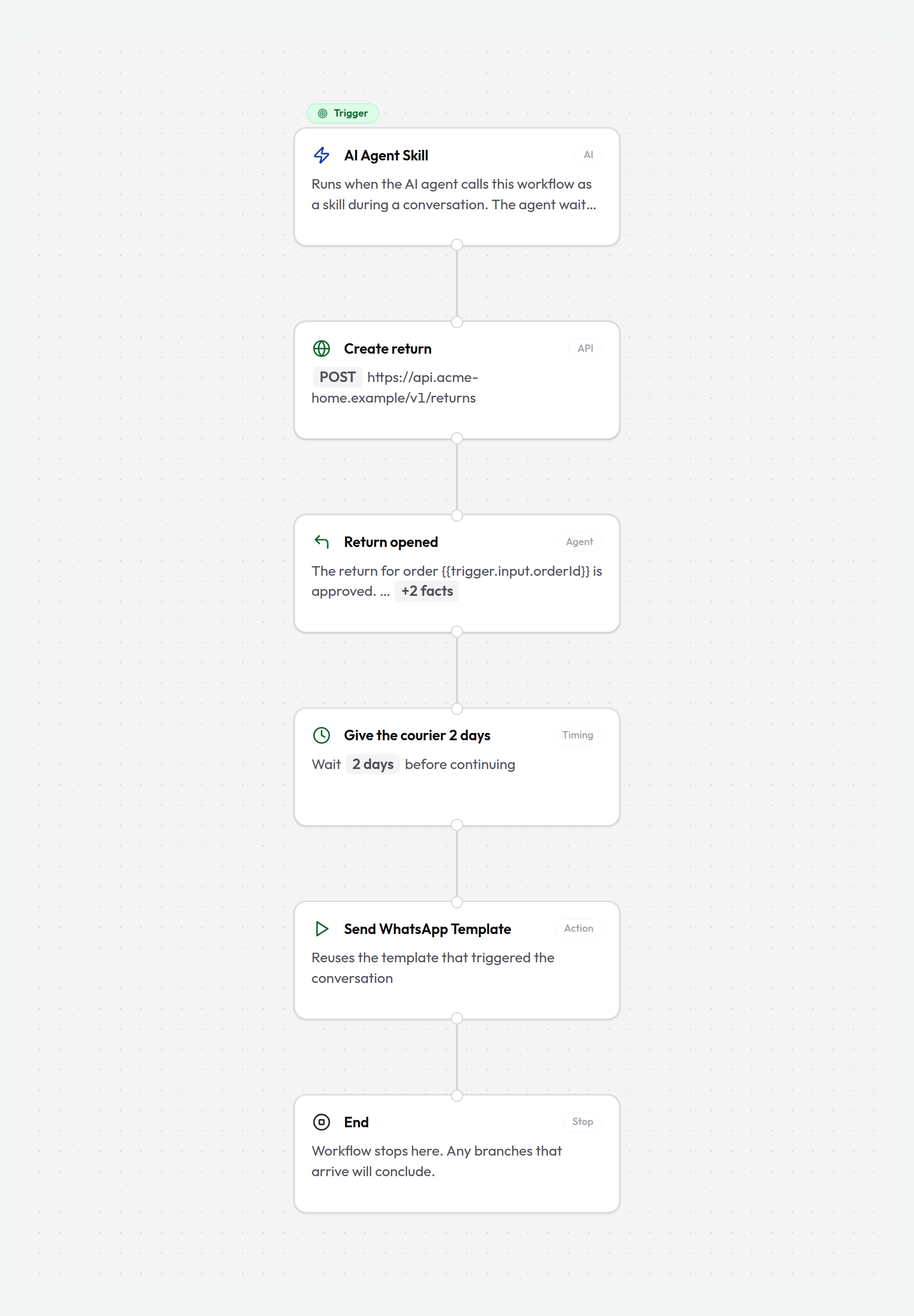
Trigger: AI Agent Skill  →  Simple API Request  →  Reply to Agent  →  Delay 2 days  →  Send WhatsApp Template
                                                        │
                                                        └── the agent reads this and replies to the customer;
                                                            everything to the right keeps running
The agent gets its answer in seconds and keeps talking to the customer. The workflow doesn't stop there — it goes on to the delay, the follow-up, the ticket, the hand-off.
Availability
AI agent skills are gated by a feature flag. If the AI Agent Skill trigger isn't in your trigger list, contact support to enable it for your organization.
When to use this instead of a JavaScript skill
A skill set skill is a JavaScript function a developer writes, packaged and versioned as a listing. An agent-skill workflow is a graph you build on the canvas you already use. Both end up as a tool the agent can call in a conversation.
| Workflow skill | JavaScript skill | |
|---|---|---|
| Who builds it | Anyone who can build a workflow | Someone who writes code |
| Where it lives | Your workspace, on the canvas | A skill set, installed into the workspace |
| Arguments | Up to 10 flat values (string, number, boolean) | Any JSON schema, including nested objects |
| What it returns | Text, plus named facts as JSON | Text, plus buttons, carousels, and other rich replies |
| Can it keep working after answering? | Yes — delays, follow-ups, later messages | No — the handler returns and it's over |
| Logic | Decisions, branches, API calls, AI extraction | Anything you can write in JavaScript |
Reach for a workflow when the job is steps — look something up, branch on the answer, tell the agent, then follow up later. Reach for a JavaScript handler when the job needs real computation, a nested response shape, a third-party SDK, or rich replies like carousels and buttons — a canvas can't do any of those, and pretending otherwise just moves the problem.
Build one
Start a workflow and pick the trigger
Create a workflow as usual, open the trigger node, and choose AI Agent Skill. The trigger carries the conversation the agent was called from, so every conversation step — Send Message, Add Label, Assign, Send WhatsApp Template — works with nothing extra to configure.
Name the skill
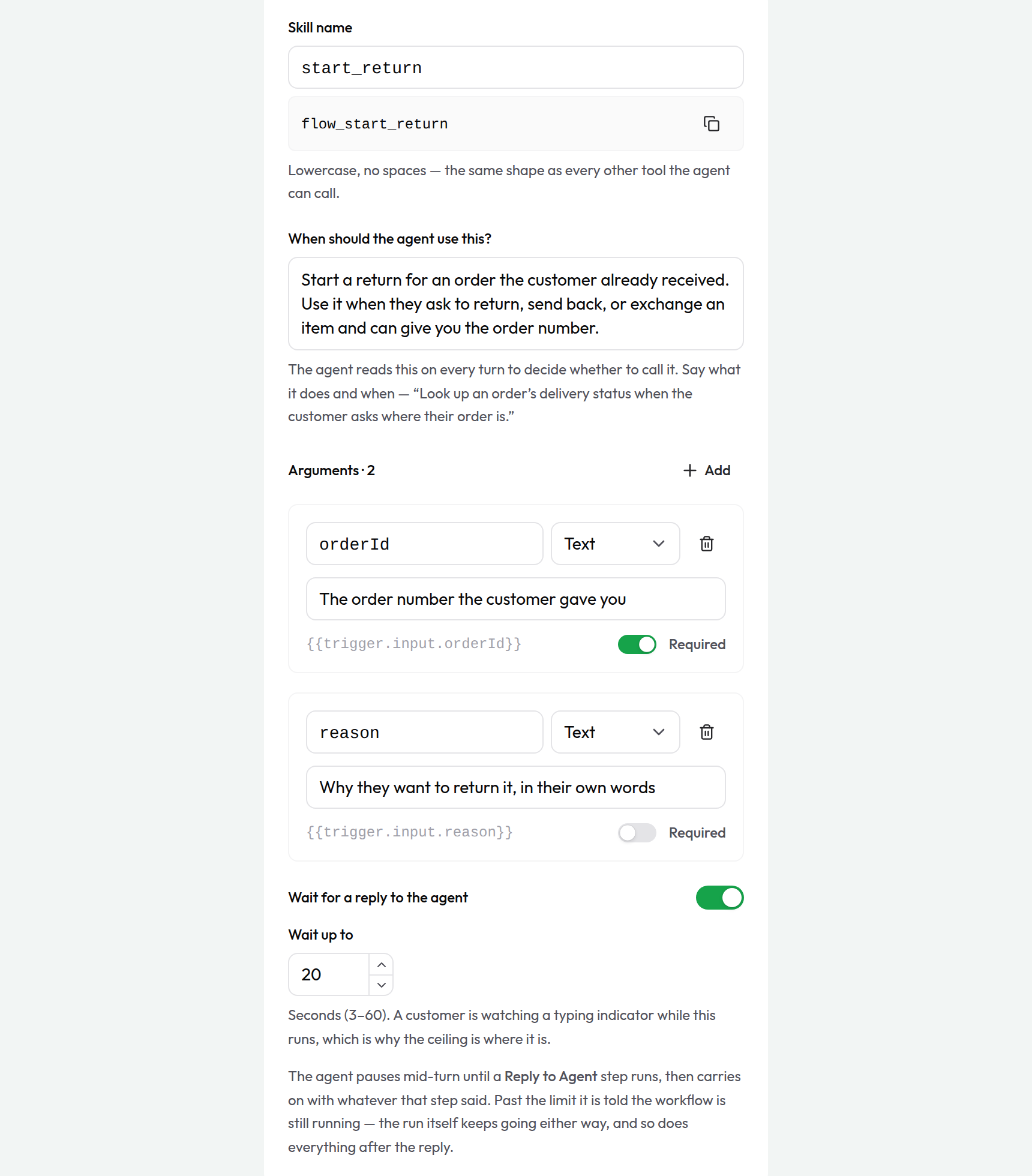
Skill name is what the agent calls. Lowercase letters, numbers and underscores, starting with a letter, 3–48 characters — start_return, check_order_status, book_service_slot. Cloodot pre-fills it from the workflow's name.
Beside the field is the full tool name, read-only: Cloodot stamps a reserved flow_ prefix on every workflow skill, so start_return is offered to the agent as flow_start_return. The prefix keeps your workspace's names from colliding with skills installed from a skill set. You never type it — copy it when you need to quote it.
Write the description the agent reads
When should the agent use this? is prompt text, not a label. The agent reads it on every turn to decide whether this is the right tool, so write it the way you'd brief a new teammate: what it does, and when to reach for it.
Start a return for an order the customer already received. Use it when they ask to return, send back, or exchange an item and can give you the order number. Don't use it for orders that haven't shipped yet — those are cancellations.
Up to 1,000 characters. A vague description is the single most common reason a skill is never called — or is called for the wrong thing. The advice in Writing block descriptions applies word for word here: describe the situation, not the machinery.
Declare the arguments
Arguments are the values the agent fills in when it calls. Add up to 10 rows, each with:
- a name — letters, numbers and underscores, starting with a letter or underscore
- a type —
string,number, orboolean - a description — again, prompt text: what the agent should put here
- required — on by default
Keep the list short. Past a handful the agent starts guessing, and a wrong argument reads to everyone as a perfectly valid call.
Flat values only
Objects and lists aren't offered as argument types. An agent asked for a nested argument mid-conversation invents its shape, and there's no good way to say on a canvas what a correct one looks like. A skill that genuinely needs structured input belongs in a JavaScript handler.
Use the arguments in your steps
Each argument arrives as {{trigger.input.<name>}} and shows up by name in the Variables picker on every later step:
{{trigger.input.orderId}}
{"order_id": "{{trigger.input.orderId}}", "reason": "{{trigger.input.reason}}"}
Values are cleaned up on the way in: a number argument the agent sends as "3" arrives as the number 3, anything the skill didn't declare is dropped, and an optional argument the agent left out resolves to empty rather than to a broken reference. Format them like any other variable — {{trigger.input.orderId | trim}}.
Reply to the agent
Add a Reply to Agent step where you want the agent to hear back, and fill in What the agent should know. Then keep building — the steps after it run just the same. See The Reply to Agent step below.
Publish
A draft is not a tool. The agent is only ever offered workflows that are Active, so hit Publish — saving alone changes nothing about what the agent can do.
A worked example: returns
A homeware store lets the AI agent start returns on its own. The merchant's own returns service issues the RMA number; the parcel is scanned when the courier picks it up. The workflow tells the agent the RMA immediately — and chases the customer two days later if nothing has been scanned.
Trigger: AI Agent Skill
   · skill name: start_return          (the agent sees flow_start_return)
   · when to use: "Start a return for an order the customer already received…"
   · arguments: orderId (string, required) · reason (string, optional)

→ Simple API Request  "Create return"
   · POST https://api.acme-home.example/v1/returns
   · header: Authorization: Bearer …
   · body: {"order_id": "{{trigger.input.orderId}}", "reason": "{{trigger.input.reason}}"}

→ Decision: Variable {{create_return.response.status}} is less than 300
   │
   ├─ True  → Reply to Agent  "Return opened"
   │            · What the agent should know:
   │              "The return for order {{trigger.input.orderId}} is approved.
   │               Give the customer the RMA number and tell them the courier
   │               collects within 2 working days."
   │            · Data: rma = {{create_return.response.body.rma}}
   │                    collect_by = {{create_return.response.body.collect_by | toDateFormat: "DD MMM"}}
   │
   │          → Delay: 2 days
   │
   │          → Simple API Request  "Check scan"
   │               · GET https://api.acme-home.example/v1/returns/{{create_return.response.body.rma}}
   │
   │          → Decision: Variable {{check_scan.response.body.scanned}} equals true
   │               ├─ True  → End
   │               └─ False → Send WhatsApp Template (return reminder)
   │                            · body variable: {{create_return.response.body.rma}}
   │                          → Add Label (Return pending) → End
   │
   └─ False → Reply to Agent  "Return failed"
                · "The return couldn't be opened for order {{trigger.input.orderId}}.
                   Apologise, don't quote an RMA number, and offer to pass this
                   to a human agent."
              → End
What the customer experiences. They say "I want to send back the kettle, order 10428". The agent calls flow_start_return, waits about a second, and answers with the real RMA number from the merchant's system. Two days later, if the courier never scanned the parcel, they get a WhatsApp reminder — from the same workflow, long after that conversation turn ended.
Set up: create the returns endpoint and put its token in the API step's Headers (headers are stripped from JSON exports, URLs and bodies are not); create a Return pending label; get a return-reminder WhatsApp template approved.
Two days later, the 24-hour window is shut
A follow-up after a long delay can't be a plain Send Message on WhatsApp — the 24-hour customer-service window has closed. Use Send WhatsApp Template with an approved template and leave the recipient blank so it sends into the same conversation. On web chat, Instagram, Facebook and email, Send Message is fine.
The Reply to Agent step
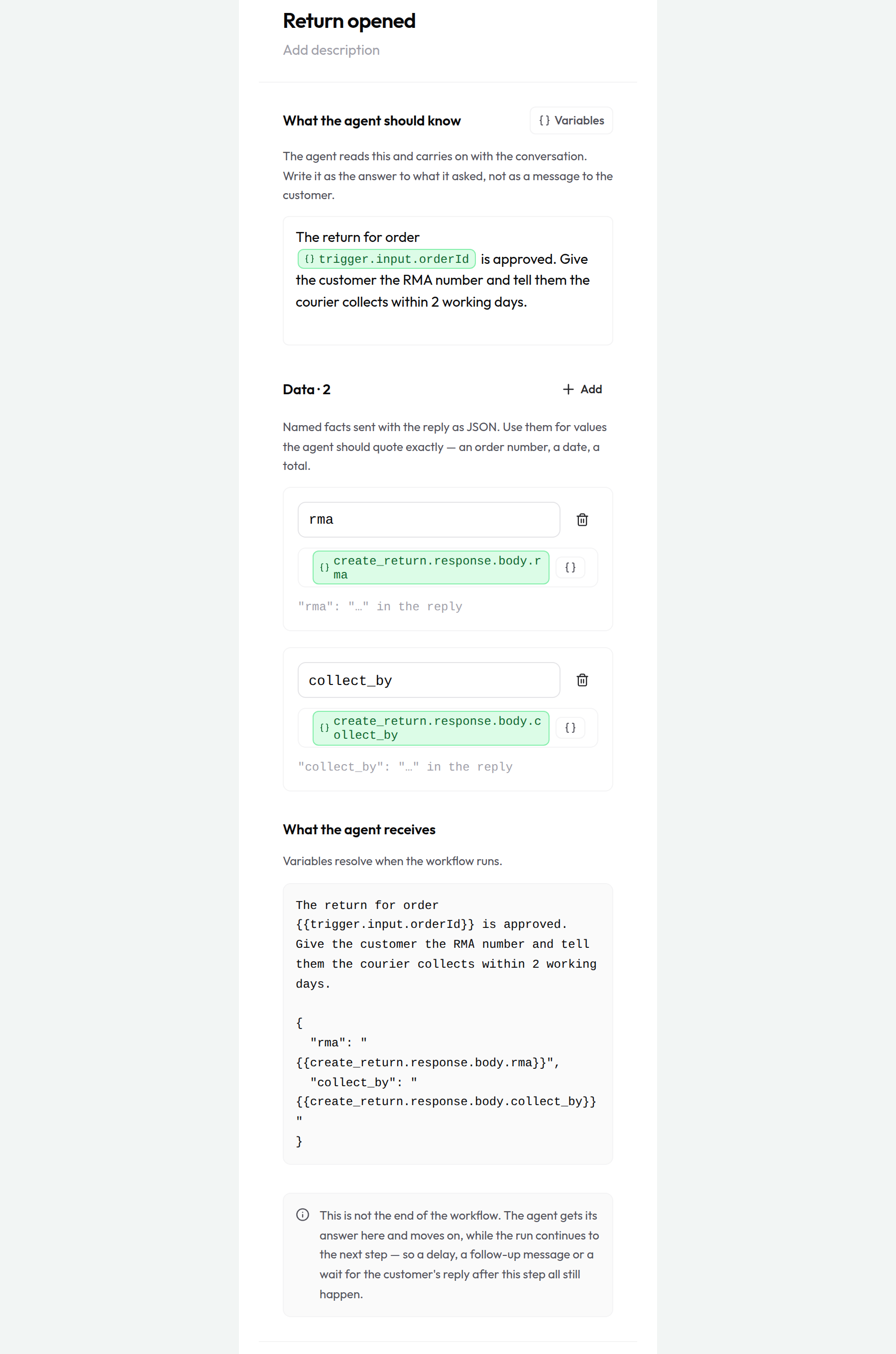
Reply to Agent hands this run's answer to the tool call waiting on it. It has two fields:
- What the agent should know — the answer, with variables. Write it as an answer to what the agent asked, not as a message to the customer: the agent decides how to phrase things for the channel it's on, and telling it what's true is more useful than handing it a script. Resolved text is capped at 8,000 characters.
- Data — up to 20 named facts (
rma,eta,total), sent alongside the reply as JSON. Use them for values the agent should quote exactly rather than paraphrase. Rows whose value resolves to empty are dropped.
Three things about it are worth knowing:
- It isn't the end of the workflow. The agent gets its answer and moves on; the run carries straight on to the next step. A delay, a follow-up message, a label change after this step all still happen. This is the whole reason the step exists.
- The first reply wins. Put one on each branch — most graphs do. Whichever one runs first is the one the agent reads; a later one on another branch is recorded in the run and changes nothing, because the agent moved on long ago.
- It only exists under this trigger. A Reply to Agent step in a workflow triggered by anything else has nobody to answer, so publishing refuses it. The editor says so on the step as soon as you add it.
The "wait for a reply" switch
Wait for a reply to the agent is on by default, with a Give up after budget of 3–60 seconds (20 by default).
On. The agent pauses mid-turn until a Reply to Agent step runs, then carries on with whatever that step said. Because the trigger declares that it answers, publishing checks that at least one Reply to Agent step is actually reachable from the trigger — a skill that promises an answer and never sends one leaves the agent waiting out the full budget for nothing.
If the budget runs out first, the agent is told the workflow is still running — not that it failed — and asked to say so rather than guess an outcome or call the skill again. The run keeps going, and its answer still lands in the run history. Set the budget by what the customer will sit through: they're watching a typing indicator.
Off. The agent is told the workflow was started, immediately, and moves on. Nothing is waited for, no Reply to Agent step is needed, and the run does its work in the background. That's the right setting for a skill whose whole job happens later — schedule the callback, open the ticket, kick off the refund.
What the agent hears when the switch is off
With the switch off, the agent is told plainly that the workflow is under way, returns no result here, and shouldn't be called again for the same request — so it confirms to the customer that it's in hand rather than inventing an outcome.
What the agent is told, whatever happens
A skill call never comes back as a bare error — the agent is always told, in words, which of these happened, so it can be straight with the customer:
| What happened | What the agent is told |
|---|---|
| A Reply to Agent step ran | Your reply, exactly as written |
| The budget ran out first | The workflow is still running — say so, don't guess the outcome, don't call it again |
| The run finished without a reply | It was done, but there's no result to describe — confirm it happened, no more |
| The run failed, or was refused on quota | It couldn't be completed — apologise and offer a human agent, don't invent a result |
| The switch is off | It was started and is running in the background |
Publishing, names, and runs
- Only Active workflows are callable. Publish it, or the agent will never see it. Pausing or archiving takes it away again — mid-conversation, on the next turn.
- The skill name has to be unique among your active workflows. Publishing a second workflow with a name that's already live is refused, naming the workflow that holds it: rename this one, or pause that one first. Two tools with one name is a tool the agent picks at random.
- No per-persona wiring. Once published, the skill is offered on every conversation your AI agent handles in this workspace.
- Runs show up where every run does. Open Runs in the editor: a run the agent started carries an AI agent badge, with the arguments it passed as the trigger data and the reply visible on the Reply to Agent step. That's the place to look when a customer was told something odd.
- Runs are billed like any other run. One agent call is one workflow execution credit, checked against the same quota as an event-triggered run.
- Test it before publishing. The editor's Test button fills in sample arguments and dry-runs the graph with side effects simulated — the reply shows up in the run so you can read exactly what the agent would have received.
How many, how often
The agent can run at most 4 workflow skills in a single reply — past that it's told to answer with what it has. And a workspace offers at most 25 skill workflows per turn (oldest first), because every tool in the list makes the others a little harder to choose between. If a newly published skill is never called and you're over that, retire one you no longer use.
Limits at a glance
| Limit | |
|---|---|
| Skill name | 3–48 characters, lowercase letters, numbers and underscores, starting with a letter |
| Description | 1,000 characters |
| Arguments | 10, each string, number or boolean |
| Argument description | 300 characters |
| Reply text | 8,000 characters after variables resolve |
| Data rows on a reply | 20 |
| Wait for a reply | 3–60 seconds (default 20) |
| Skill runs per agent reply | 4 |
| Skill workflows offered per turn | 25 |
The agent isn't calling my skill
Work down the list:
- Is it published? Draft, Paused and Archived workflows aren't offered. The status column on the Workflows page is the fastest check.
- Is the description doing its job? "Handles returns" tells the agent almost nothing. Say what it does and when to call it — and, when it matters, when not to.
- Do the argument descriptions say what to put there? An argument the agent can't fill confidently is a call it doesn't make.
- Is another active workflow holding the name? Publishing refuses a duplicate outright and names the workflow that has it — pause that one, or rename this skill and publish again.
- Did it run and you missed it? Check Runs for an AI agent badge. A run that's there means the agent called it and the answer is on the Reply to Agent step.
- Are you over 25 skill workflows? The newest ones drop off the list. Pause the ones you don't use.