Trigger nodes
The events that start a workflow — one per workflow — and the variables each one hands to the steps that follow.
Every workflow starts with exactly one trigger — the event that kicks it off. When the event happens, the trigger fires the workflow and hands the rest of the steps a bundle of data about what just happened. You reach that data downstream with {{trigger.<field>}} templates (see Using variables).
Conversation context
Some triggers fire on a conversation — a new message, a resolution, a star. These carry a conversationId, so any conversation-scoped action (Send Message, Add Label, Assign…) works straight away.
Other triggers aren't tied to a conversation — an Incoming Webhook, a Contact Stage Changed event, or a Workflow Error. Under those, conversation actions have nothing to act on unless an earlier step supplies one (for example Send WhatsApp Template to a phone number creates a conversation, and Find Contact resolves a contact). Each trigger below notes whether it carries a conversation.
Fields every conversation trigger provides
When a trigger carries a conversation, these variables are always available on every step that follows:
{{trigger.conversationId}} · {{trigger.conversationStatus}} · {{trigger.conversationChannel}} · {{trigger.conversationLabels}} · {{trigger.conversationStarred}} · {{trigger.messageText}} · {{trigger.assignedUserId}} · {{trigger.assignedPersonaId}} · {{trigger.contactId}} · {{trigger.contactName}} · {{trigger.contactEmail}} · {{trigger.contactPhone}}
Conversation triggers
New Conversation
Fires when a brand-new conversation is created — the first inbound message on any channel. The most common starting point: welcome the customer, route them, or triage with AI.
- Carries a conversation: Yes
- Key variables: the shared conversation fields above
Conversation Opened
Fires when a conversation's status changes to Open (for example, a resolved thread that gets a new reply).
- Carries a conversation: Yes
- Loop prevention: the Open Conversation action is hidden under this trigger — reopening on "opened" is a loop.
Conversation Resolved
Fires when a conversation is marked Resolved. Great for post-resolution follow-ups, satisfaction surveys, or advancing a contact's pipeline stage.
- Carries a conversation: Yes
- Loop prevention: the Resolve Conversation action is hidden under this trigger.
Conversation Starred
Fires when a conversation is starred.
- Carries a conversation: Yes
- Loop prevention: the Star Conversation action is hidden under this trigger.
WhatsApp Flow Submitted
Fires when a customer completes and submits a WhatsApp Flow — a native in-chat form (booking, lead capture, survey). The answers arrive as variables you can branch on and reuse. See WhatsApp Flows.
- Carries a conversation: Yes
- Key variables:
{{trigger.flowValues.<field>}}— the submitted answers, keyed by field name (e.g.{{trigger.flowValues.km_range}}). Match on them with a Decision node's Variable condition.{{trigger.flowToken}}— the token stamped on the outbound send and echoed back{{trigger.flowSource}}— where the flow was sent from (oneoff,campaign,workflow,sample,api){{trigger.campaignId}}— set when a campaign sent the flow{{trigger.templateName}}— the template whose button opened the flow, when known
Because every flow asks different questions, flowValues can't be listed ahead of time. Open the trigger and Select a flow — Cloodot reads the answer fields straight out of that flow's design, and they become {{trigger.flowValues.…}} suggestions in every later step. Picking a flow only names the fields; the trigger still fires for every flow, so branch on an answer with a Decision node if a workflow should serve one flow only.
Routing triggers
AI Agent Assigned
Fires when an AI persona is assigned to a conversation. Use it to set up context the moment AI takes over.
- Carries a conversation: Yes
- Key variable:
{{trigger.personaVersionId}}— the assigned AI persona version
This fires on most new conversations
Cloodot auto-assigns a default persona to new conversations, and that automatic assignment fires this trigger too — so a workflow here runs on nearly every new conversation, not only when a persona is assigned by hand. See Workflows and the built-in AI agent.
Human Agent Assigned
Fires when a team member is assigned to a conversation — for notifications, logging, or SLA timers.
- Carries a conversation: Yes
- Key variable:
{{trigger.userId}}— the assigned user
AI trigger
AI Agent Skill
Fires when the AI agent calls this workflow as a skill during a conversation — not on an event, but because the agent decided this was the thing to do, with the arguments it filled in. The trigger node's fields are the tool the agent is offered: its name, the description it reads to choose, and the arguments it fills. Full guide: AI agent skills.
- Carries a conversation: Yes — the agent only ever calls a skill from inside a conversation it's handling, so conversation actions work with nothing extra.
- Key variables:
{{trigger.input.<name>}}— the arguments the agent passed, one per row you declared (e.g.{{trigger.input.orderId}}). They appear in the Variables picker by name the moment you add them.{{trigger.skillName}}— the skill's own name
- Configured on the trigger: Skill name (3–48 characters, lowercase letters, numbers and underscores, starting with a letter — offered to the agent as
flow_<name>), When should the agent use this? (≤1,000 characters), Arguments (up to 10, eachstring,numberorboolean), and Wait for a reply to the agent with a Give up after budget of 3–60 seconds. - Answering: a Reply to Agent step hands the agent a result without ending the run — the steps after it keep going. That step only works under this trigger.
A draft is not a tool
The agent is only offered workflows that are Active, and a skill name has to be unique among your active workflows. Publish it, or nothing can call it.
Label triggers
Label Added
Fires when a label is added to a conversation. A label makes a clean signal — tag something manually or with AI, and let this trigger do the rest.
- Carries a conversation: Yes
- Key variable:
{{trigger.labelIds}}— the label IDs that were added - Loop prevention: the Add Label action is hidden under this trigger.
Label Removed
Fires when a label is removed from a conversation.
- Carries a conversation: Yes
- Key variable:
{{trigger.labelIds}}— the label IDs that were removed - Loop prevention: the Remove Label action is hidden under this trigger.
CRM triggers
Contact Stage Changed
Fires when a contact's lifecycle stage changes in your pipeline — for example, moving from New to Qualified. Use it to run a playbook every time a contact reaches a stage.
- Carries a conversation: No — a stage change isn't tied to a conversation. Conversation actions need a conversation supplied by an earlier step (e.g. Send WhatsApp Template to
{{trigger.contactPhone}}). - Key variables:
{{trigger.contactId}}·{{trigger.contactName}}{{trigger.fromStageId}}·{{trigger.fromStageName}}— the previous stage (absent if the contact had none before){{trigger.toStageId}}·{{trigger.toStageName}}— the new stage
- Loop prevention: the Change Contact Stage action is hidden under this trigger.
Webhook trigger
Incoming Webhook
Fires when an external system POSTs JSON to the workflow's unique URL. This is how you wire Cloodot to any tool that can send a webhook — a store, a form, a CRM, a no-code automation.
- Carries a conversation: No — the payload is free-form JSON.
- Key variables: anything in the posted body, addressed by path —
{{trigger.payload.order.id}},{{trigger.payload.items.0.sku}}, and so on.
Setup, in the trigger's panel:
- The panel shows the endpoint URL and a signing secret. By default every request must be signed (HMAC-SHA256 — the panel shows exactly how).
- If your sender can't sign requests (a simple script or no-code tool), switch off Require signed requests. Anyone who knows the URL can then trigger the workflow, so treat the URL like a password.
- Use Listen for a request in the Sample event section to capture one real request — it works before the workflow is published. The captured fields then show up as variable suggestions on every later step, and dry runs are prefilled with them. The first real event is captured automatically if you never listen.
When the sender signs in its own scheme
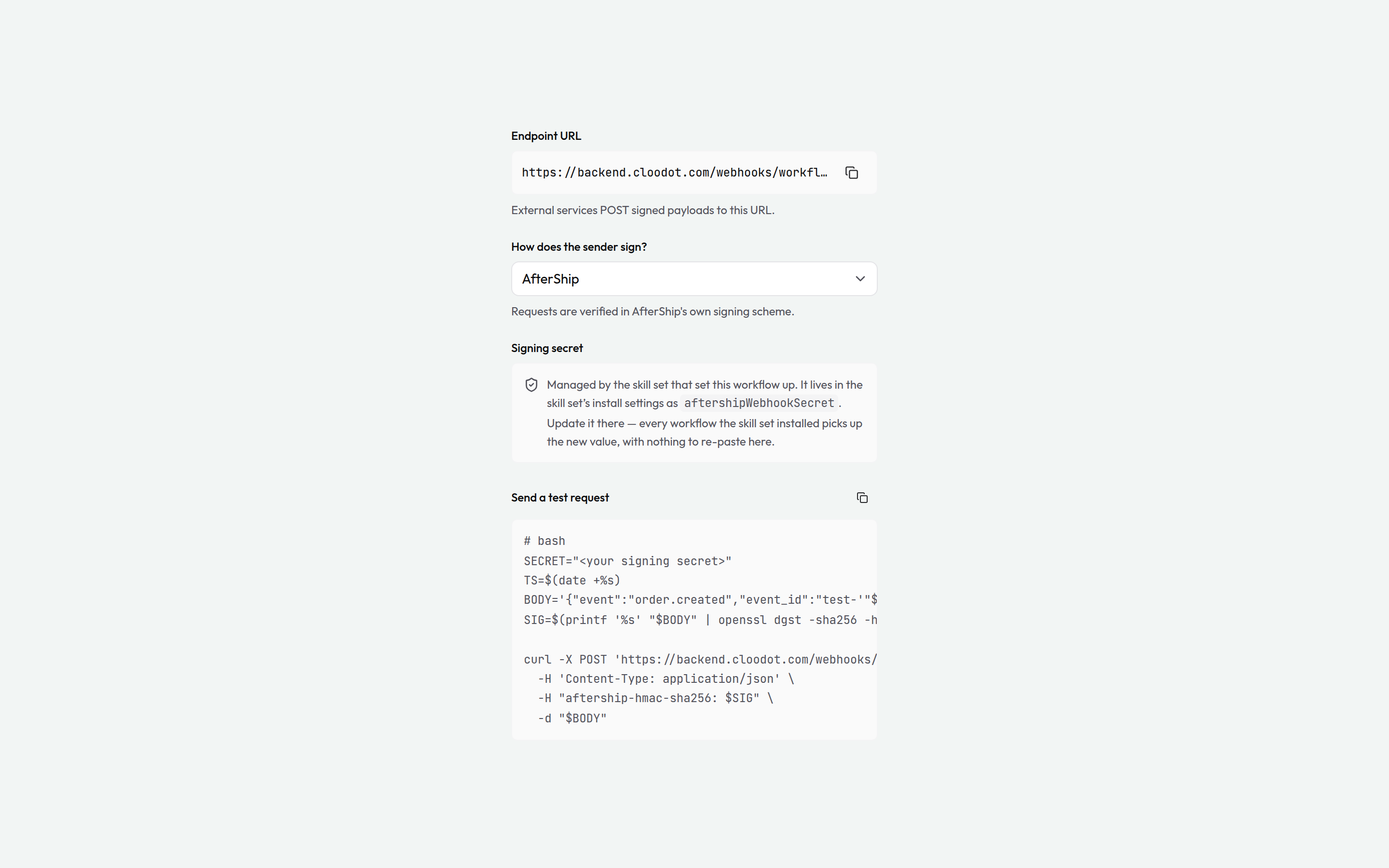
Services like Razorpay, Stripe, AfterShip, Cal.com, and ShipRocket sign their webhooks in their own dialect — you can't teach them Cloodot's. The How does the sender sign? picker in the trigger panel switches verification to the provider's scheme; requests are then checked exactly the way that provider signs them, and the Cloodot signing headers stop mattering.
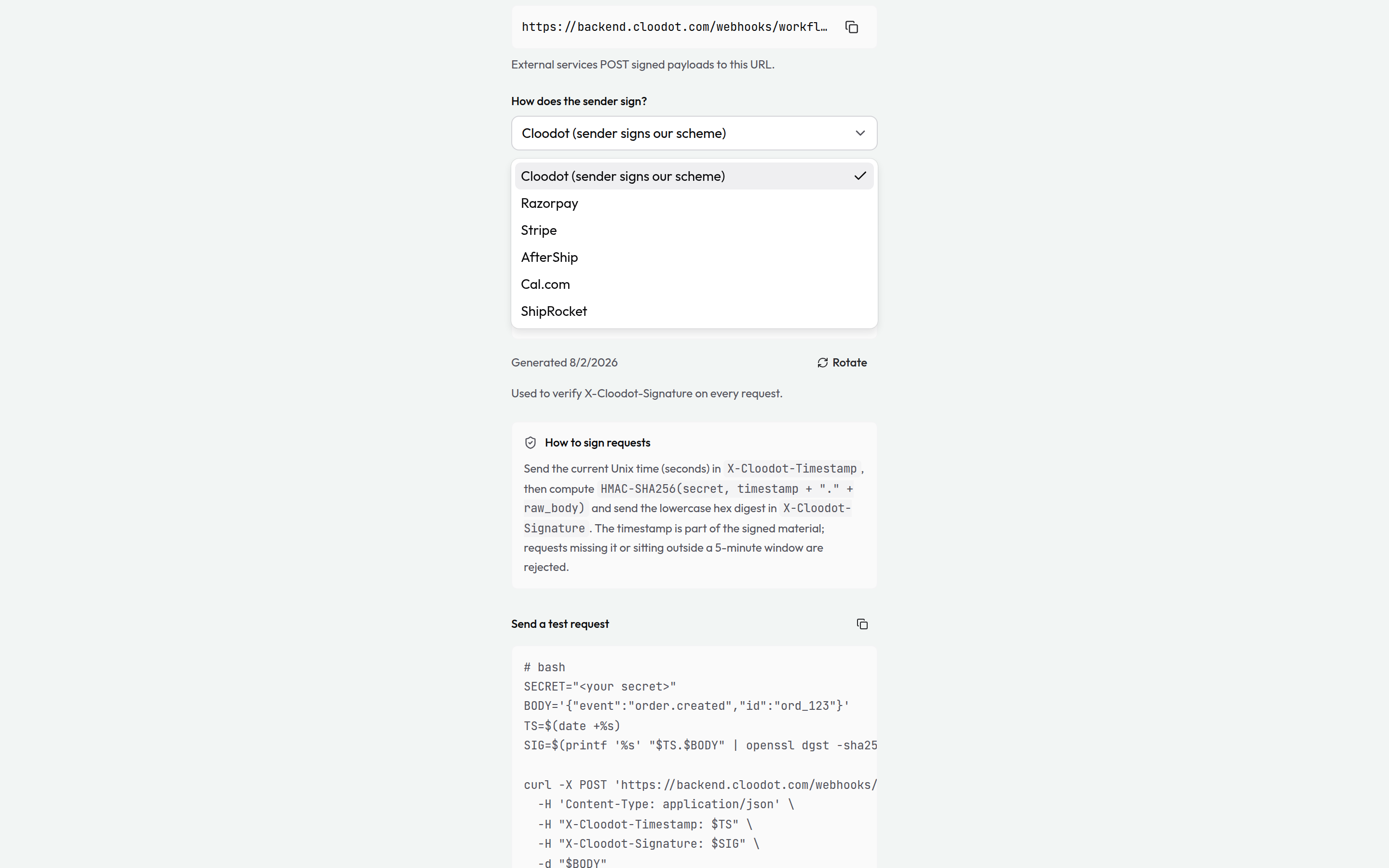
Picking a scheme changes three things in the panel:
- The signing secret becomes the provider's — paste the secret the provider shows you when you create the webhook in their dashboard. If the workflow was installed by a skill set, the secret lives in that skill set's install settings instead, and the panel says so: update it there and every workflow the skill set installed picks up the new value.
- The test request re-templates to the picked scheme — the right header, digest, and signed material for that provider, ready to paste into a terminal. Schemes that sign a timestamp get one; schemes with a delivery id get a fresh one per run, so a repeated test is never mistaken for a duplicate delivery.
- Duplicate deliveries are suppressed. Providers redeliver on any hiccup; when the scheme carries a delivery id, a redelivered event runs once, not twice — for seven days per id.
Verification always fails closed: a request that doesn't verify — wrong signature, unresolvable secret — is rejected without a reason in the response, and nothing runs.
System trigger
Workflow Error
Runs when another workflow fails for good (after all its retries). Build an error handler once — alert a channel, log to an external service — and point other workflows at it under their execution settings.
- Carries a conversation: Not guaranteed — error handlers must work for non-conversation workflows too.
{{trigger.conversationId}}is present only when the failed run had one. - Key variables:
{{trigger.failedWorkflowName}}·{{trigger.failedWorkflowId}}·{{trigger.error}}·{{trigger.failedRunNumber}}·{{trigger.failedExecutionId}}·{{trigger.failedAt}}·{{trigger.retryCount}}
Error workflows never cascade
A Workflow Error trigger never fires because of another error workflow — so a broken alert can't set off an infinite chain.
Related
Workflows
Automate your conversation management with visual, drag-and-drop workflows that trigger on events and take action automatically.
Action nodes
The steps that do the work — send messages, manage conversations, route, apply AI, and keep your CRM in sync — with the parameters and outputs of each.