Procedure examples
Three complete procedures, built one entry at a time — order tracking, returns, and booking — that you can adapt to your own business.
The Procedures page explains what each kind of entry does. This page is the other half: three finished procedures, built in order, with the reasoning for why each entry sits where it does.
Every example comes from the same fictional workspace — Northbeam Supply, an outdoor clothing retailer selling online and from four stores across the Pacific Northwest, whose agent is called Aria. Swap the nouns for yours and the shape holds.
Before you start
A procedure can only point at things that already exist, so it's worth having these in place first:
| You'll need | Why | Where |
|---|---|---|
| An AI Persona | Procedures belong to one | Intelligence → Agent |
| The skills you want to run | Only installed skill sets appear in the @ picker | Skill Sets |
| The custom fields you want to check | A decision reads them by name | Custom Fields |
| The labels you want to check | Same | Labels |
Northbeam has two skill sets installed (Shopify and Northbeam Store Ops), conversation fields called Order status and Preferred store, and a VIP label. Every reference in the examples below points at one of those.
You don't need all of it to start. A procedure made only of steps and a note is already useful — add the skill and the decision once the basics read correctly.
Example 1 — "Where is my order?"
The most common support question there is, and a good first procedure: it asks for something, looks it up, decides on the answer, then offers the customer somewhere to go next.
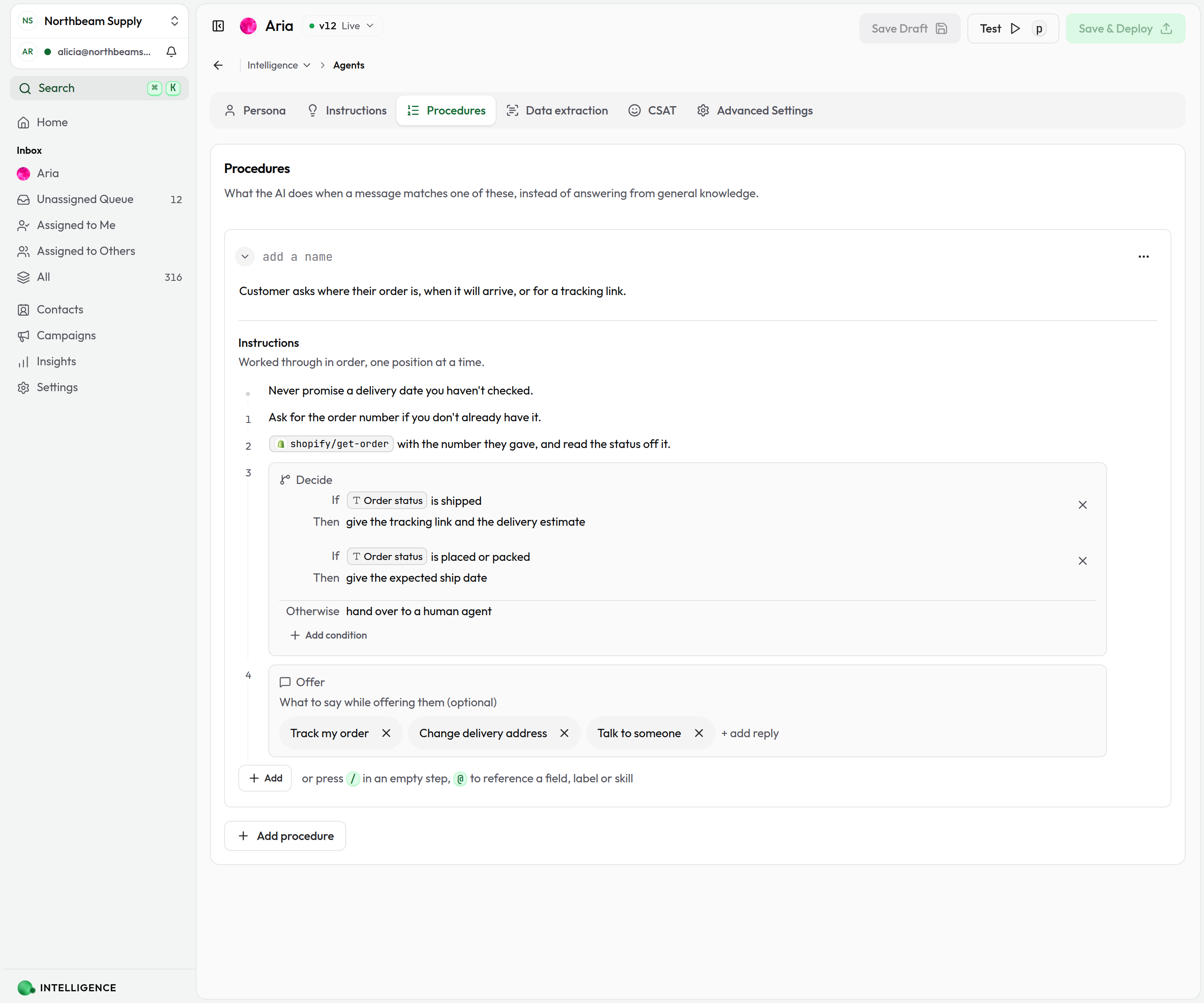
Build it
1. Add the procedure
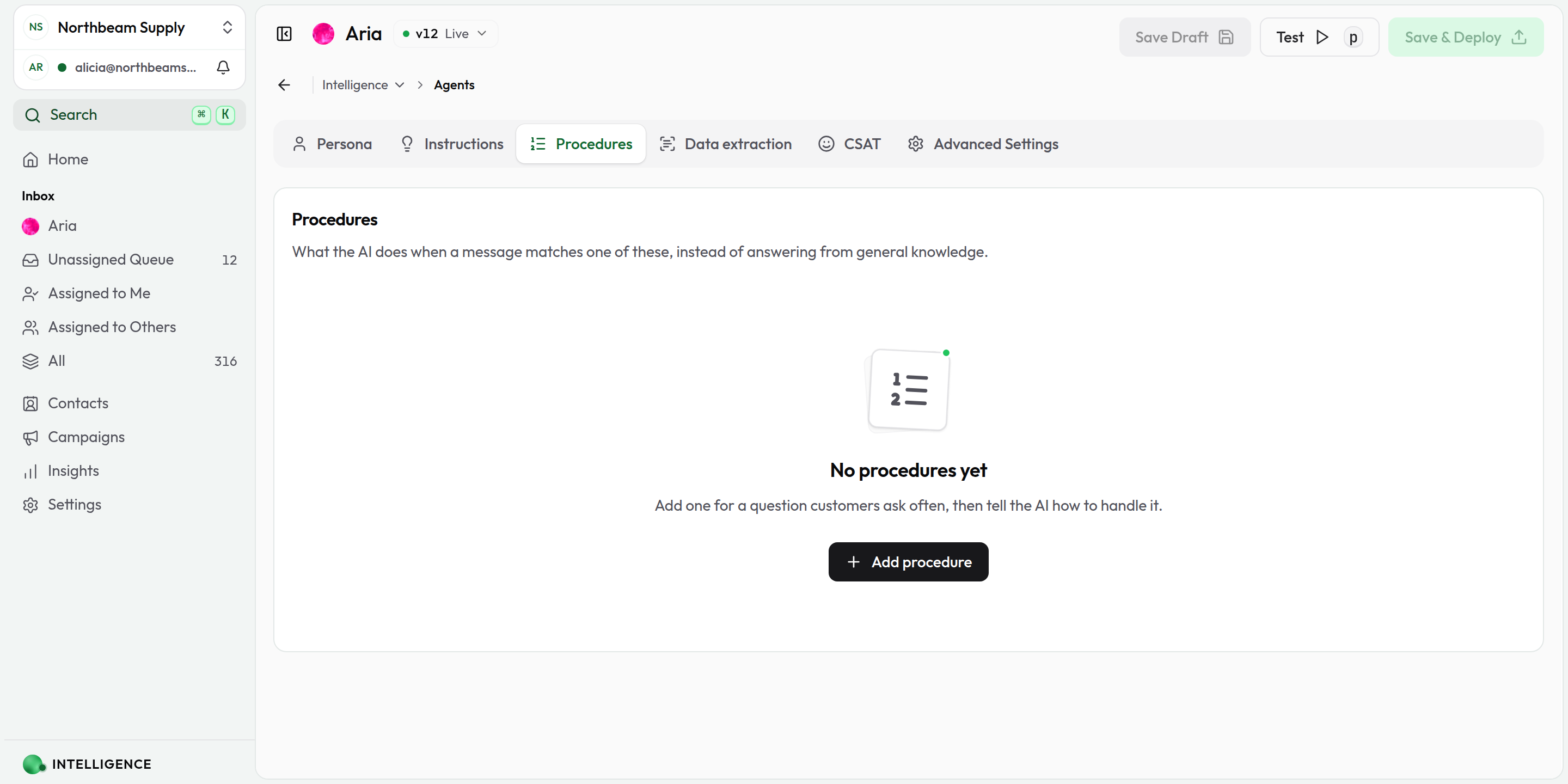
On Intelligence → Agent → Procedures, click Add procedure. If this is your first one, the tab looks like this:
2. Describe when it applies
In the description field at the top, write the situation, not the topic:
Customer asks where their order is, when it will arrive, or for a tracking link.
That one sentence is everything the agent matches on, so it has to name the situation and the ways customers reach it — where is it, when will it arrive, tracking link. The boundary matters as much as the coverage: refunds and shipping costs are both about orders, and a description that only said "order" would compete with those procedures on every mention of a parcel.
3. Add the rule that applies throughout
Click Add, choose Note, and write:
Never promise a delivery date you haven't checked.
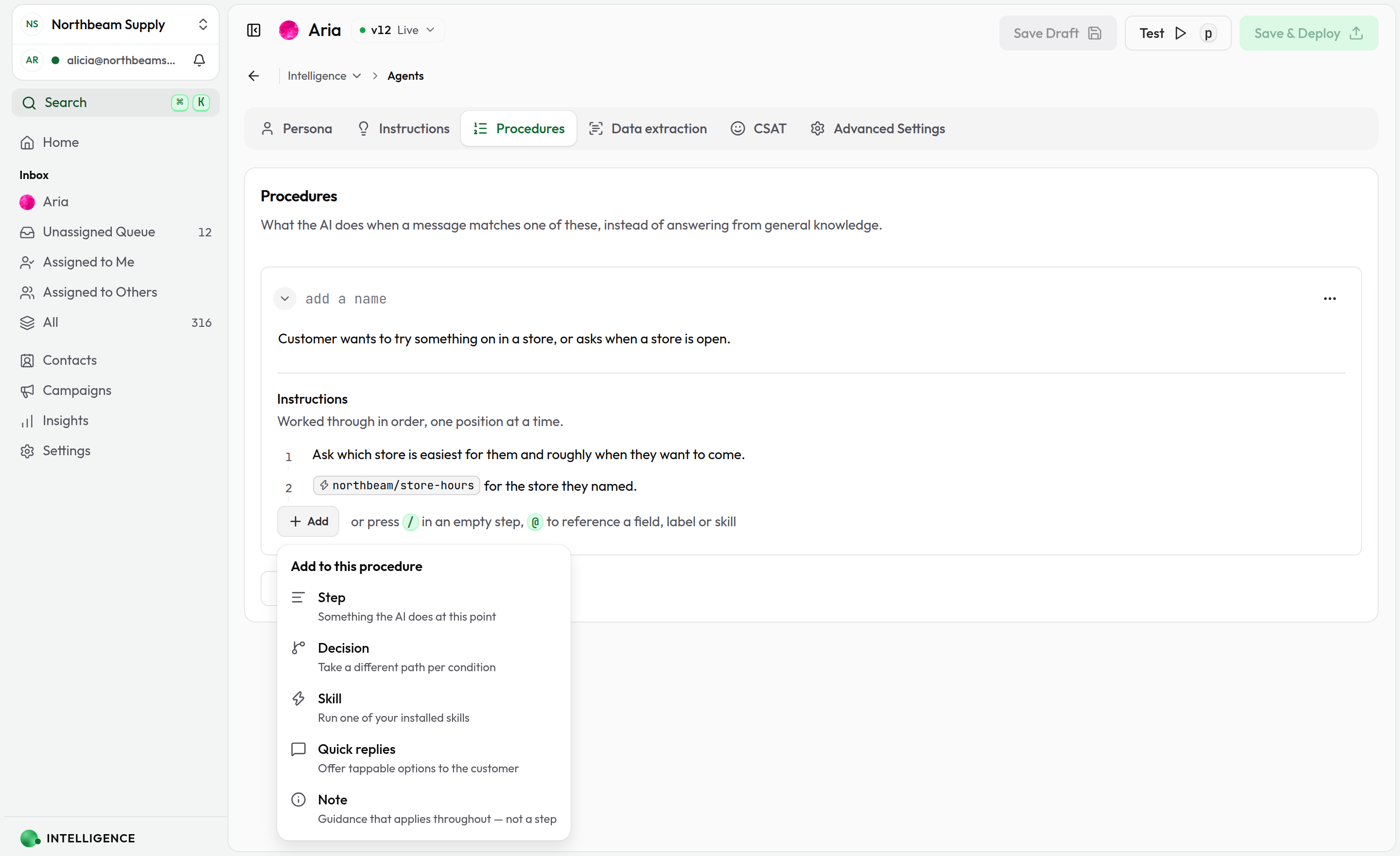
A note isn't numbered — it holds for the whole procedure rather than at one point in it. Rules go in notes; work goes in steps.
4. Ask for what you need
Add a Step:
Ask for the order number if you don't already have it.
This is position 1. "If you don't already have it" is doing real work — without it the agent asks customers to repeat something they gave two messages ago.
5. Look it up
Add a Skill, type @, and pick Get order from the Shopify set. Then keep typing to say what to do with it — it's all one sentence:
@shopify/get-order with the number they gave, and read the status off it.
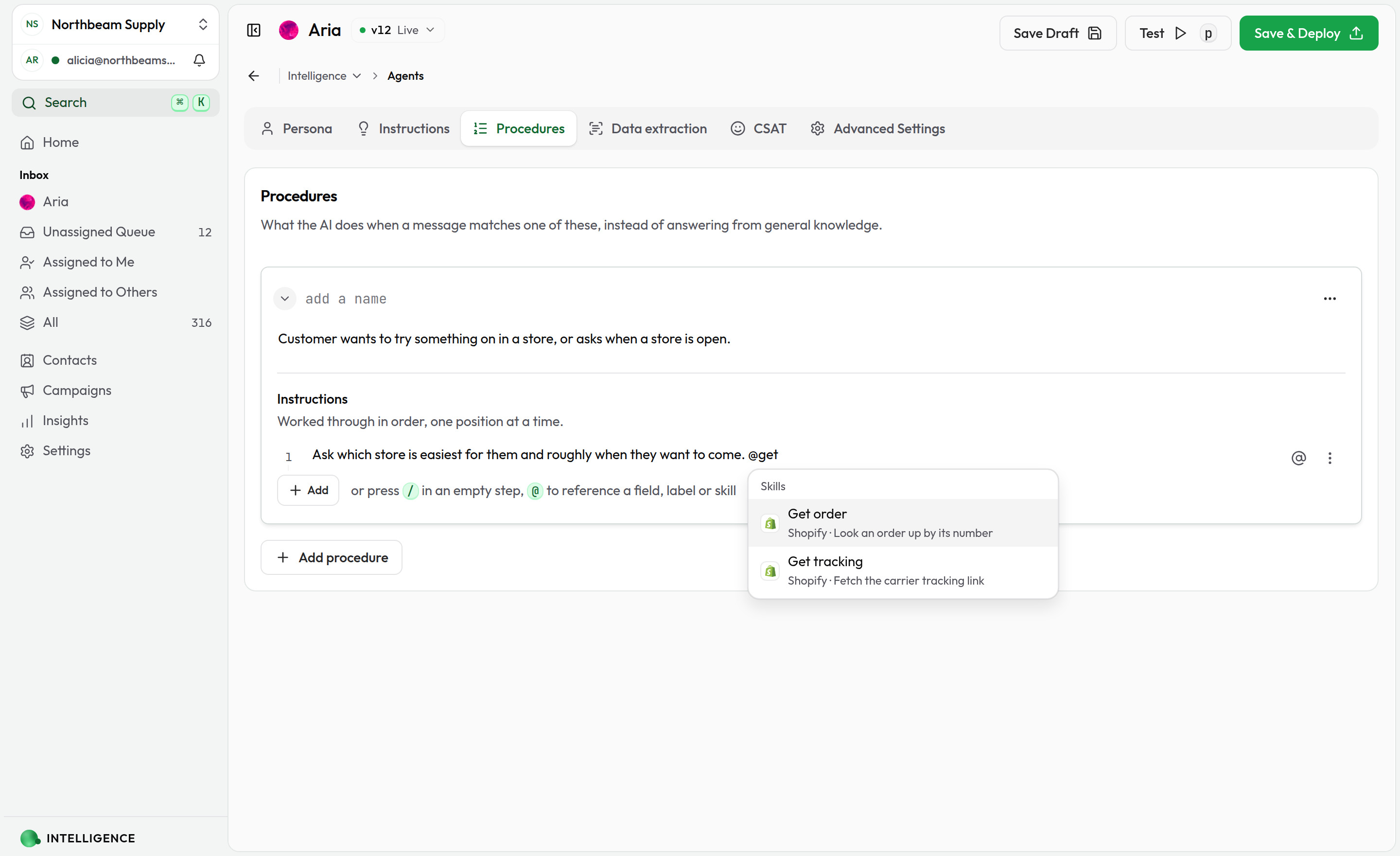
This is position 2 because the skill needs the order number, and position 1 is where you asked for it.
6. Decide on the answer
Add a Decision. In the first condition type @ and pick Order status, then finish each arm:
| Condition | Then | |
|---|---|---|
| If | Order status is shipped | give the tracking link and the delivery estimate |
| If | Order status is placed or packed | give the expected ship date |
| Otherwise | hand over to a human agent |
The @Order status chip is the difference between a condition the agent can check and one it has to guess at. The Otherwise arm is what stops an unexpected status turning into an invented answer.
7. Offer somewhere to go next
Add Quick replies and click + add reply three times. Each reply has a label the customer taps and a message that comes back:
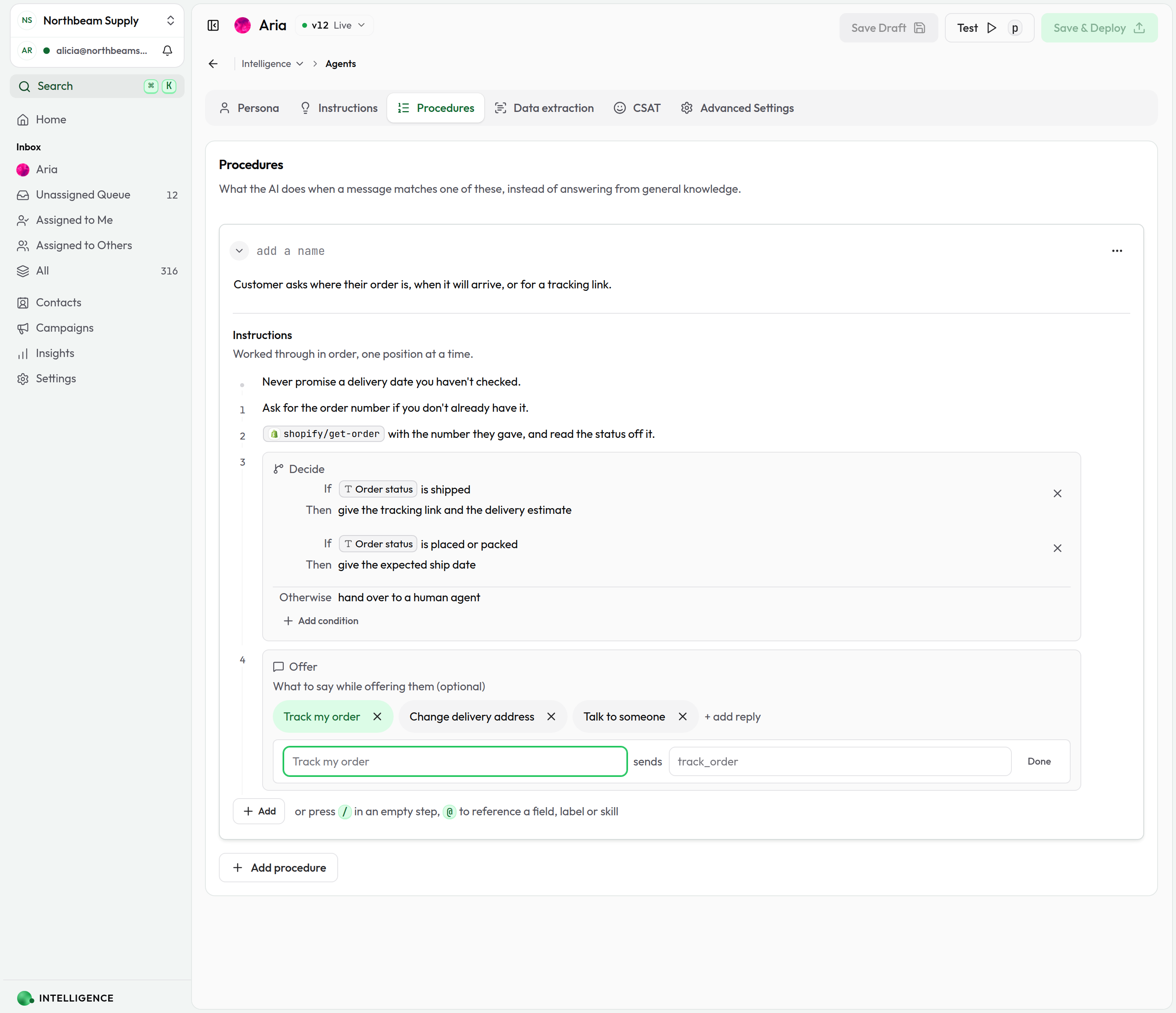
| Label | Message |
|---|---|
| Track my order | track_order |
| Change delivery address | change_address |
| Talk to someone | handover |
These sit at position 4 — last — because they only make sense once the customer has an answer. Put them at 1 and you offer "Track my order" before anything has been looked up.
8. Test it, then deploy
Click Test and send "where's my order?". When the procedure fires, the playground jumps to the Procedures tab and rings the card that ran. Once it behaves, Save & Deploy.
The finished procedure
| # | Kind | What it says |
|---|---|---|
| — | Note | Never promise a delivery date you haven't checked. |
| 1 | Step | Ask for the order number if you don't already have it. |
| 2 | Skill | @shopify/get-order with the number they gave, and read the status off it. |
| 3 | Decision | If Order status is shipped → tracking link. If placed or packed → expected ship date. Otherwise → hand over. |
| 4 | Quick replies | Track my order · Change delivery address · Talk to someone |
Example 2 — Returns and exchanges
Same shape, one step further: this one decides on a label as well as a field, and runs a skill from inside a decision arm rather than at a position of its own.
Description
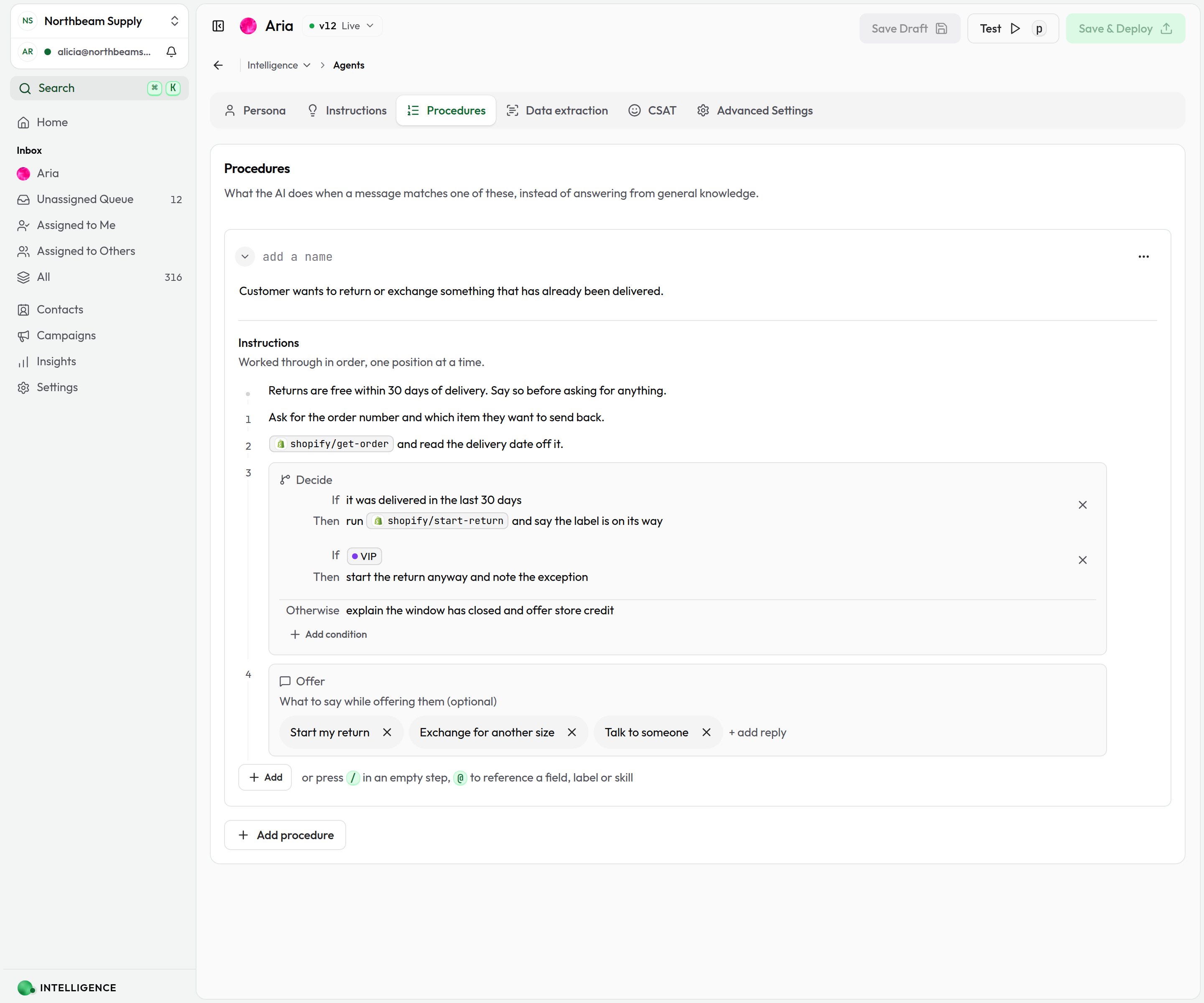
Customer wants to return or exchange something that has already been delivered.
- Should trigger: "How do I return this?", "It doesn't fit, can I exchange it?", "I want to send this back"
- Should not trigger: "Where is my order?", "Has this shipped?"
| # | Kind | What it says |
|---|---|---|
| — | Note | Returns are free within 30 days of delivery. Say so before asking for anything. |
| 1 | Step | Ask for the order number and which item they want to send back. |
| 2 | Skill | @shopify/get-order and read the delivery date off it. |
| 3 | Decision | If it was delivered in the last 30 days → run @shopify/start-return and say the label is on its way. If VIP → start the return anyway and note the exception. Otherwise → explain the window has closed and offer store credit. |
| 4 | Quick replies | Start my return · Exchange for another size · Talk to someone |
What's different here
- The note leads with the good news. "Returns are free within 30 days" is a policy that applies for the whole procedure, so it's a note — and putting it first means the agent says it before it starts asking questions.
- A skill inside a decision arm.
@shopify/start-returnonly runs on the arm that reaches it. A skill entry at its own position would run whatever the decision found. - The exception is a label, not a judgement. If VIP is something the agent can check. If they're an important customer is something it would have to decide, and it will decide it differently on different days.
- Arms are read top to bottom. The in-window arm comes first, so a VIP inside 30 days gets the ordinary path rather than the exception.
Example 3 — Book a fitting in store
A procedure that runs two skills with a decision between them — the shape you want whenever the second call depends on what the first one returned.
Description
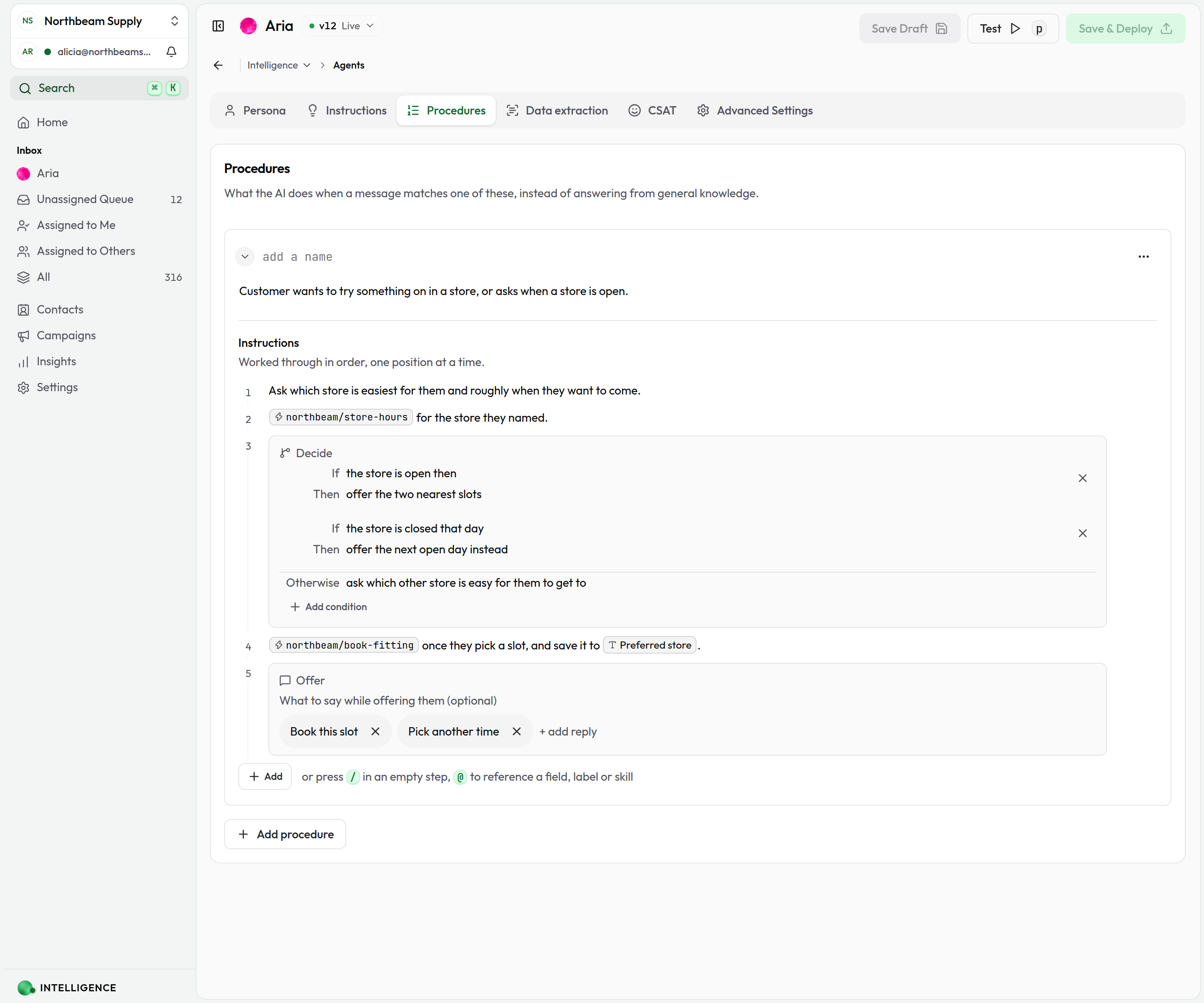
Customer wants to try something on in a store, or asks when a store is open.
- Should trigger: "Can I come and try it on?", "Is the Portland store open on Sunday?"
- Should not trigger: "Do you ship to Canada?"
| # | Kind | What it says |
|---|---|---|
| 1 | Step | Ask which store is easiest for them and roughly when they want to come. |
| 2 | Skill | @northbeam/store-hours for the store they named. |
| 3 | Decision | If the store is open then → offer the two nearest slots. If the store is closed that day → offer the next open day instead. Otherwise → ask which other store is easy for them to get to. |
| 4 | Skill | @northbeam/book-fitting once they pick a slot, and save it to Preferred store. |
| 5 | Quick replies | Book this slot · Pick another time |
What's different here
- Two skills, in order. Hours first, booking second, with the decision in between. This is exactly what a single "run these skills" list can't express.
- A reference used to write, not just to read. save it to Preferred store points the agent at the field to fill in, so the next conversation already knows which store they use.
- Quick replies close the loop. "Book this slot" and "Pick another time" are the only two things left to do at position 5, which is what makes them worth a button.
Adapting these to your business
The procedures above are retail, but the shape isn't:
| If you're… | "Where is my order?" becomes | The skill becomes |
|---|---|---|
| A clinic | "When is my appointment?" | Look the booking up |
| An agency | "Where has my project got to?" | Fetch the project status |
| A SaaS product | "Why was I charged?" | Fetch the latest invoice |
| A restaurant | "Is my table booked?" | Check the reservation |
The pattern is the same every time: ask for the identifier → look it up → decide on what came back → offer the next action.
A checklist before you deploy
- Every procedure's description reads as a situation, not a topic
- No two descriptions could reasonably match the same message
- Every skill you named is installed and enabled
- Every @ chip is live — a renamed or deleted field turns the chip red
- Decisions have an Otherwise, or you're happy with what happens without one
- Quick replies sit after the answer, not before it
- You've sent each procedure's trigger message in the playground and watched the right card ring
- You've clicked Save & Deploy — customers only see deployed versions